Write with selected context
Bring project notes and a supported model profile to a trusted computer. Work with the documents you choose, then review the resulting draft.
ThoxKey - KICKSTARTER PRELAUNCH
ThoxKey™ is a 128 GB drive-resident AI runtime with a native USB-C connector. The models and AI engine live on ThoxKey, while a compatible host supplies the compute. Nothing installs on the host, and unplugging the drive takes the runtime with you.
Get an email when the Kickstarter campaign opens.

Three-color lineup
ThoxOS / ThoxBeam™ / ThoxKey™
ThoxBeam™ is the portable AI runtime engine engineered for ThoxKey™, within ThoxOS. Carry your runtime, model assets and workspace. Let a compatible computer supply the compute.
Engineered for ThoxKey. Experienced through ThoxOS.
What you carry
Your portable environment.
The engine within ThoxOS
The specialized host-compute runtime.
What you experience
Context, permissions, work and results.
01 / Inside the experience
Explore ThoxBeam’s reference workspace alongside ThoxOS desktop, chat and MeshStack companion surfaces. Each capture is labeled for what it actually demonstrates.
Development-reference screen recording
View full-size screenshot (opens in a new tab)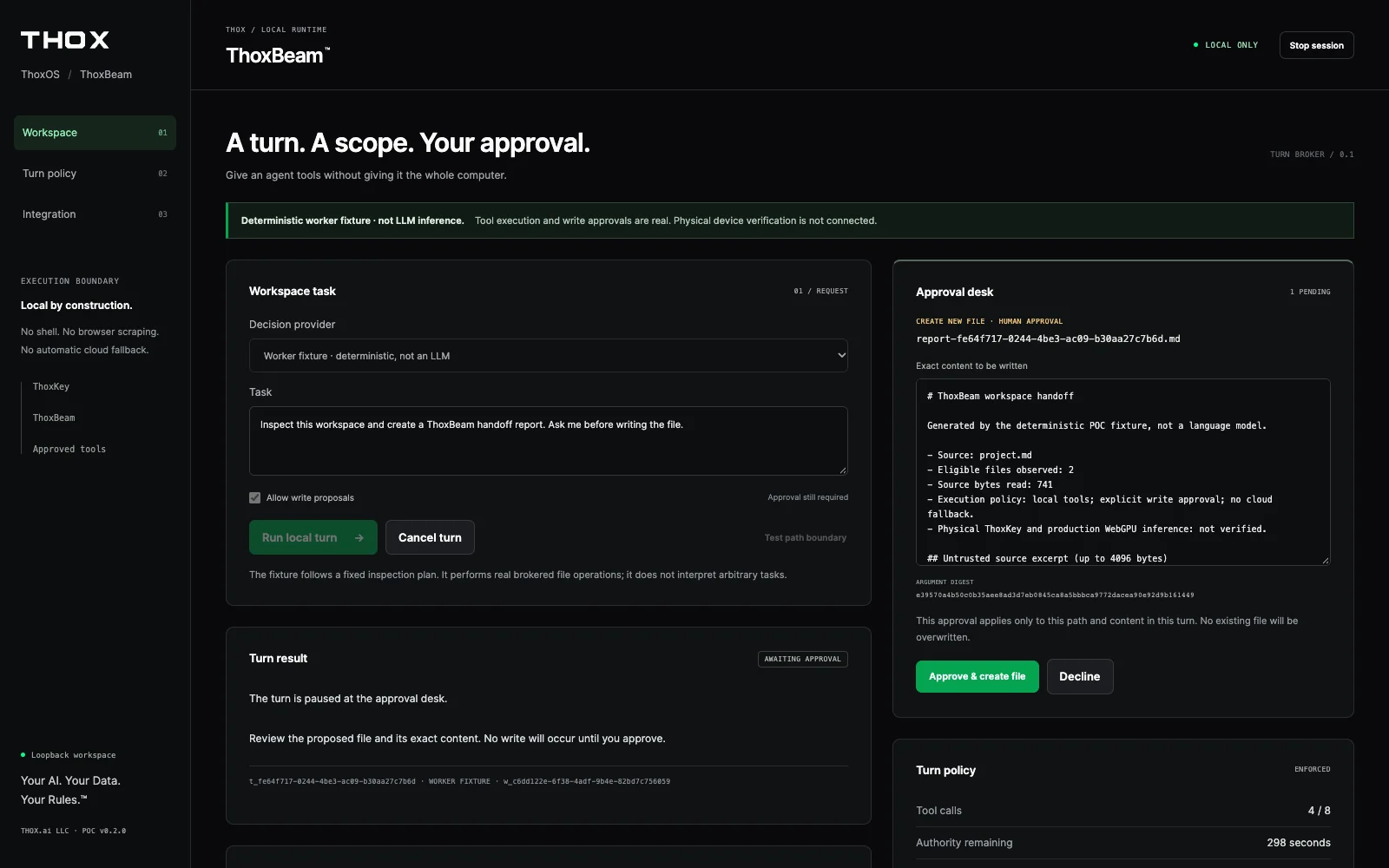
Explore the reference, one state at a time.
Select a capture to inspect it without playing the recording.
Watch the reference interface move from a request to an exact-content approval and a result. The model proposes; permission checks and your approval determine what may happen next.
Explore the workflowWhat you’re seeing
Recorded reference UI with a deterministic task fixture. No production model inference, physical ThoxKey telemetry or packaged-drive security is demonstrated.
Silent media. This text reproduces the English caption track; no playback is required.
ThoxBeam development reference. Deterministic task fixture, not model inference.
The fixture inspects a synthetic workspace. The proposed write waits for exact-content approval.
Approval permits the scoped file operation. The result returns to the same workspace.
02 / One coordinated workflow
Walk through the intended customer journey. This explainer describes responsibilities, not a live device connection or a running agent.
01 / THOXKEY
ThoxKey carries the portable runtime, compatible model assets and workspace resources. You bring the environment to a trusted, compatible computer.
On the drive: runtime assets + model assets + workspace.
Storage capacity is not the same as the host memory available to run a model.
03 / Put it to work
Intended workflows, subject to the runtime release, model and host you use.
Bring project notes and a supported model profile to a trusted computer. Work with the documents you choose, then review the resulting draft.
Keep portable resources together while the compatible host handles execution. Review proposed file changes before permitting a write.
Use MeshStack where the workflow supports it to reach permitted capabilities. Resource discovery, data access and action approval remain separate decisions.
04 / The host matters
Windows, macOS and Linux are target host environments—not interchangeable capability guarantees. Match the runtime package and model to the computer in front of you.
A qualified Windows host is a target for the portable ThoxBeam experience. Check the specific launcher, browser, graphics driver, model and available memory—not just the Windows version.
Standard ThoxKey operates within the existing host OS. It is not a Windows replacement.
TARGET ENVIRONMENTS · Qualification is specific to the released package and host. These tabs are not an availability or universal-compatibility list.
A mobile interface is not a promise of native USB-drive inference on that device. Companion access and features are client- and release-specific.
The engineering-preview direction is separate from standard ThoxKey’s host-delivered runtime. It does not change the standard campaign offer.
Read about ThoxOS Desk →05 / Clear answers
No. ThoxKey is the portable device, ThoxOS is the experience, and ThoxBeam is the specialized portable AI runtime inside ThoxOS. MeshStack connects authorized resources. ThoxWork, Coming Soon, organizes human-and-agent work.
No. The drive carries runtime and model assets; the compatible host supplies CPU/GPU execution and working memory. A model fitting on the drive does not mean it will fit or run on every host.
In the portable runtime architecture, supported local workflows use resources you control rather than a required remote inference server. Optional mesh or hosted paths need separate authorization. This website and its media are hosted; viewing a demo is not proof of offline execution.
A portable workspace does not isolate you from the computer running it. Use a trusted, qualified host and follow its security policy. The host OS and browser may retain state; do not treat drive residency as a zero-trace or host-isolation guarantee.
The ThoxBeam recording demonstrates the development-reference interface with a deterministic task fixture. The other media show their named ThoxOS or MeshStack surfaces. None is a substitute for release-specific hardware, inference or security qualification.
No. Standard ThoxKey uses a host-delivered ThoxOS experience through ThoxBeam. ThoxOS Desk is a distinct engineering-preview direction. Its images, supported hardware and availability must be qualified separately.
Use the campaign link below for the current ThoxKey offer and campaign status. Preview software, companion views and future ThoxWork capabilities do not add rewards, guarantees or release dates to that offer.
One ecosystem. Your next step.
Choose a THOX device. Use ThoxOS. Connect authorized resources through MeshStack. Organize human-and-agent work through ThoxWork when available.
ThoxWork™ · Coming Soon
The USB 3.2 Gen 2 specification, up to 10 Gbps, describes the native USB-C interface. It is not a claim about model speed, inference latency, or guaranteed performance.
1 × 128 GB ThoxKey™ in Matte Black, Space Gray, or Arctic White. Native USB-C connector. No adapter or converter is included.
Starter Kit: 1 × ThoxKey and 1 × ThoxAir. Tier pricing is published on Kickstarter.
Developer Kit: 1 × ThoxKey, 1 × ThoxAir, and 1 × ThoxMini. Tier pricing is published on Kickstarter.
Founders Kit: 1 × ThoxKey, 1 × ThoxAir, 1 × ThoxMini, and 1 × ThoxClip. Tier pricing is published on Kickstarter.
The Kickstarter campaign is in prelaunch. Review the four items, 15 reward tiers, and the Extra ThoxKey add-on.
Live demo
ThoxKey is one of the four devices you can pick. Register with your email, choose a device, and talk to ThoxOS in your browser. Ask for a job the device cannot hold on its own and MeshStack places it on a peer that has room — the data stays inside the mesh.
INTERACTIVE 3D
Rotate ThoxKey, switch finishes, and inspect the short USB-C (7.5 mm), recessed THOXKEY face, green status pill, ribbed slider, and plate vent map. Body lock 47.97 × 24.0 × 9.0 mm.
EXTERIOR SPECIFICATION
The full exterior sheet for ThoxKey: six orthographic views, the three approved finishes on identical geometry, material swatches, and a feature map of what sits on each face.
