Skip to content

Official collection · Founder's Club preview

THOX.ai DigitalExpression

Your collection. One shortcut away.

THOXY™, the original swag stickers, the device marks you know, and Craig-O-CEO—together in one collection. Find your expression, then share it through a compatible app.

Expressions
34
Collection
Series 01
In the app
Local assets
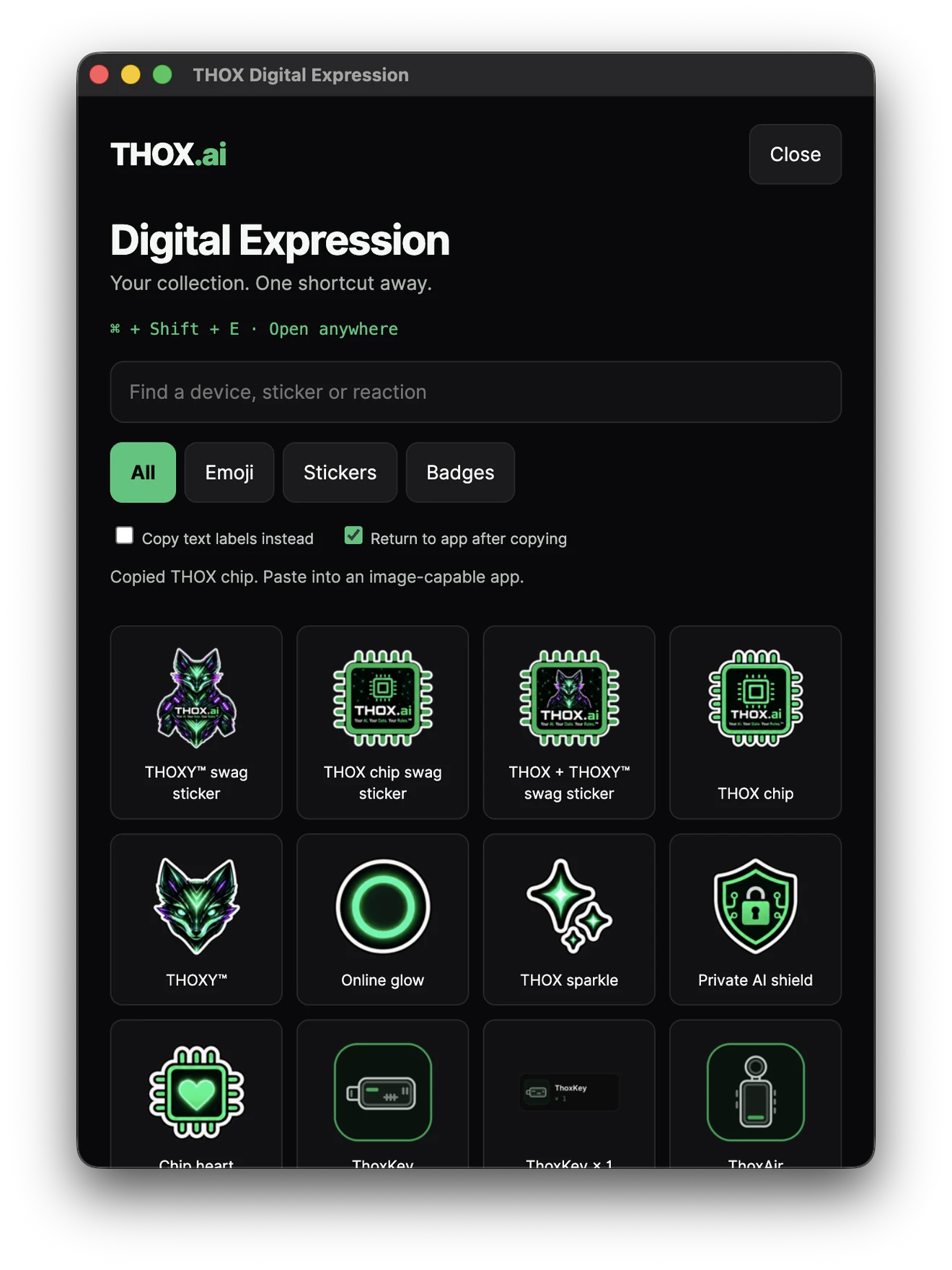
THOX DigitalExpression on macOS, showing the All expressions view of the official THOX expression collection.
Actual macOS app preview. Founder's Club TestFlight links are in the public preview section.

Founder's Club Public Preview

Experience the next THOX interaction layer before broader release.

THOX Expression is here.

Founder's Club members can use THOX Expression on iPhone and Mac, plus THOX Expression Keyboard on iPhone. Install the previews, use them in your normal workflow, and tell us what should change.

Express more. Type less. THOX it your way.

  • THOX Expression for iPhone

    Coming soon
  • THOX Expression for Mac

    Coming soon
  • THOX Expression Keyboard for iPhone

    Coming soon

Apple TestFlight public preview. Coming soon. Not an App Store release.

One collection. Native perspectives.

Explore genuine screens from the macOS app and the iPhone and iPad simulator builds. Switch platforms, follow the workflow, and open any screen for a closer look.

macOS, unmistakably THOX.

A tray and shortcut companion. Search your collection and explicitly copy a PNG or text label.

Genuine app captures. The iPhone and iPad images show a baseline simulator build, not an installed public release.

Actual macOS app preview, captured September 28, 2026.

See the app in motion.

Real screen recordings, not a concept film. Play at your own pace, use the native controls, and turn on the visual-description captions when useful.

macOS app walkthrough

14 seconds · silent

Actual silent macOS app recording. Image delivery still depends on the receiving app.

What happens in this recording

This silent recording shows the native desktop panel, scrolling through the full collection, then selecting Emoji and Badges. No receiving application or message sending is demonstrated. The caption track contains visual descriptions, not a transcript of speech.

iPhone app walkthrough

88 seconds · silent

Baseline iPhone simulator recording. Silent walkthrough; not proof of a public release or delivery into another app.

What happens in this recording

This silent baseline simulator recording shows the app, setup guidance, collection filters, a ThoxMini search and the system share sheet. It returns to the collection without showing an external message being sent. Later builds may differ. The caption track contains visual descriptions, not a transcript of speech.

Series 01 · Craig-O-CEO

Find the THOX that feels like you.

Series 01 plus the official Craig-O-CEO founder pack: nine expression assets already in the collection. Filter Founders to see them.

34 of 34 expressions · Select a design for a full-size preview.

Official digital artwork. App access and image support are platform-specific; a badge is not a hardware accessory or an ownership credential. Craig-O-CEO is a founder expression pack, not a hardware reward.

Less importing. More expressing.

The native app carries its collection. The final action stays yours, and the receiving app decides which image formats it accepts.

  1. 01

    Find your mark

    Browse the categories or search for a device, THOXY, Craig-O or a reaction. The app carries the collection with it.

  2. 02

    Choose your route

    Share from the iPhone or iPad app. On Mac, copy the PNG or choose its plain-text label. Native sticker and keyboard routes have their own setup.

  3. 03

    Make it yours

    Review the image in a compatible destination and choose Send or Place yourself. Copying never means a message has already been sent.

iPhone & iPad quick start

Start with an authorized build. The simplest route is inside the app.

  1. Open THOX Expression and select All, Emoji, Stickers or Badges.
  2. Search for a device or reaction, then tap its image.
  3. Choose a compatible destination in the system share sheet. Review the draft before sending.

App sharing does not require the optional keyboard or Full Access. The system sticker extension is bundled; its availability still depends on the build, OS and receiving app.

macOS quick start

Keep the authorized app running and open its tray panel.

  1. Use the tray, or Command + Shift + E when the shortcut is registered and available.
  2. Search or filter the collection. Leave “Copy text labels instead” off to copy a PNG.
  3. Choose an expression, switch to an image-capable destination, and paste. Labels are an explicit plain-text alternative.

Close hides the panel; the tray’s Quit action stops the app. Receiving-app paste, dragging and focus behavior require platform-specific acceptance. Do not bypass macOS security to install a development build.

Optional keyboard, explicit permission. On iPhone, labels and basic typing do not need Full Access. Image copying from the optional THOX keyboard does, and still requires your Paste action.

Know what is ready for your platform.

The screenshots show real development progress. Public installers, store approval and receiving-app compatibility are separate milestones.

macOS

Public Preview

Founder's Club members can join the THOX Expression TestFlight for Mac. This is an early look, not a Mac App Store release.

See Founder preview status

iPhone

Public Preview

Founder's Club members can join THOX Expression and THOX Expression Keyboard on TestFlight. This is an early look, not an App Store release.

See Founder preview status

iPad

Internal preview

A containing app, optional keyboard and sticker extension are in development testing. A dedicated iPad TestFlight is not listed on this page yet.

Read the iPhone & iPad quick start

Android

In development

An image-keyboard implementation is being developed. Native release and receiving-app compatibility still need validation. No Play download is offered here.

Ask about Android access

Windows & Linux

In development

Desktop source targets these platforms. Platform-specific installers and acceptance testing are still pending.

Ask about desktop access

Be part of the preview.

Watch the Founder's Club section for preview status, or email if you want iPhone, iPad, Mac or another platform.

Email about preview access

The THOX you know. A new way to express it.

ThoxOS powers the device experience. MeshStack connects authorized resources. ThoxWork is coming soon. DigitalExpression adds a companion app and a shared visual collection—not another operating platform.

ThoxKey™ is a 128 GB drive-resident AI runtime with a native USB-C connector. A compatible host supplies the compute. No adapter or converter is included. ThoxBeam is its specialized runtime within ThoxOS.

A few clear answers.

Image expressions, native apps and system keyboards do different things. Here is what to expect.

Are these new emoji characters?

No. They are THOX image expressions. Image attachments and custom-sticker support depend on the receiving app. A text-only comment cannot display a custom image as a new Unicode character.

Do I have to import every image separately?

The native app bundles the collection, including Series 01 and the Craig-O-CEO founder pack. One app installation and any user-controlled keyboard setup are the intended route. Public native distribution is still being prepared; the website collection is a preview, not a system keyboard installation.

Does the iPhone keyboard need Full Access?

Only its optional image-copy route does. Ordinary typing and explicit text labels work without it. Containing-app sharing and the sticker extension do not require keyboard Full Access. Enable the keyboard and that permission yourself only when needed; then paste the copied image in a compatible field.

How do I get early access?

Founder's Club public preview access is coming soon. Watch the Founder's Club section on this page. You can also email support@thox.ai. TestFlight access is a preview, not an App Store listing.

Is Series 01 a hardware reward or ownership badge?

No. It is a digital artwork collection. Device badges and Craig-O-CEO founder expressions are expressive designs, not proof of ownership, verification marks or extra hardware accessories. The Kickstarter project defines its own rewards and availability.

What stays local?

The app bundles its expression images and does not need a THOX runtime account to browse them. Sending or pasting content into another service follows that service’s behavior. Opening a policy or support link can also use the network.
Your AI. Your Data. Your Rules.™